Silo Object Locking
Overview
SILO 20261109 update: SILO 20261109 enforces Object Lock checks across bulk deletion, multi-pool versions, directory null versions, replicated purges, lifecycle delete-all rules, and batch jobs; upgrade all serving nodes so every pool and site enforces the same lock rules. Earlier, SILO 20261018 repaired retention authorization and protected-version overwrites (SN-2026-015/016; Server 20260916 remains affected): every retention update requires s3:PutObjectRetention, and weakening active GOVERNANCE retention additionally requires x-amz-bypass-governance-retention: true and s3:BypassGovernanceRetention. Updating a client or Console does not patch the Server, and upgrading does not restore previously overwritten data or retention. See the security advisory for affected paths and mitigations.
MinIO Object Locking (“Object Retention”) enforces Write-Once Read-Many (WORM) immutability to protect versioned objects from deletion. MinIO supports both duration based object retention and indefinite legal hold retention.
Historical upstream MinIO Object Locking received a third-party compliance assessment for SEC 17a-4(f), FINRA 4511(c), and CFTC 1.31(c)-(d) from Cohasset Associates. That assessment applies only to the evaluated historical upstream MinIO release and has not been independently re-certified for PGSTY SILO.
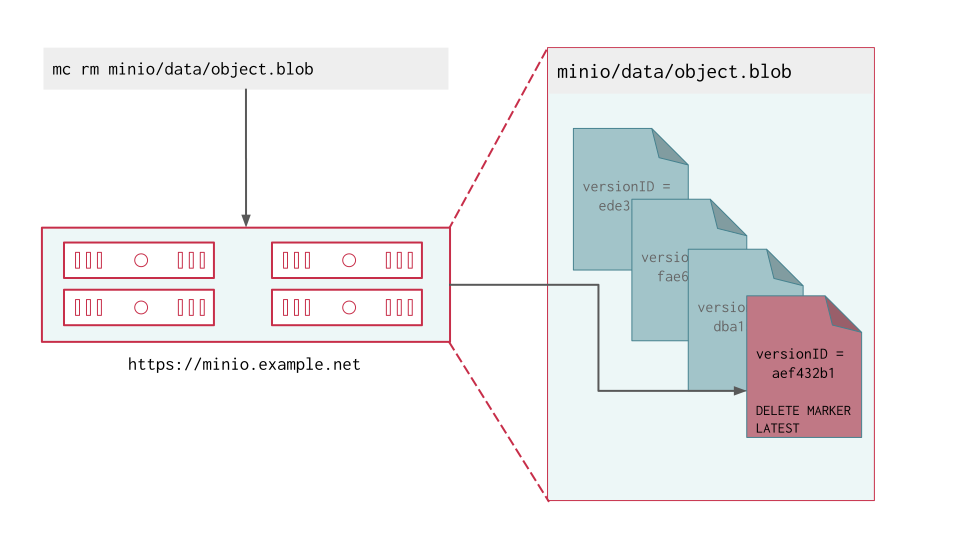
MinIO versioning preserves the full history of object mutations. However, applications can explicitly delete specific object versions.
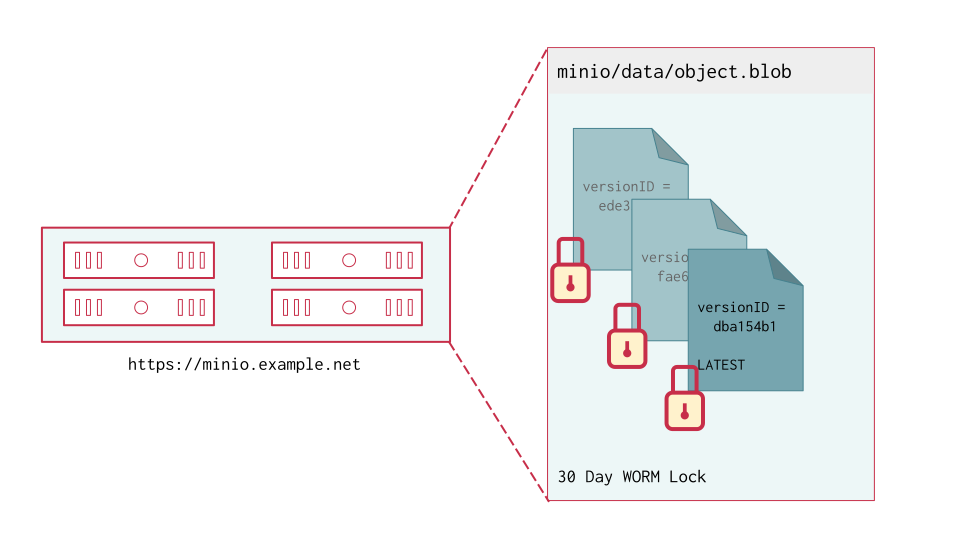
Applying a default 30 Day WORM lock to objects in the bucket ensures a minimum period of retention and protection for all object versions.
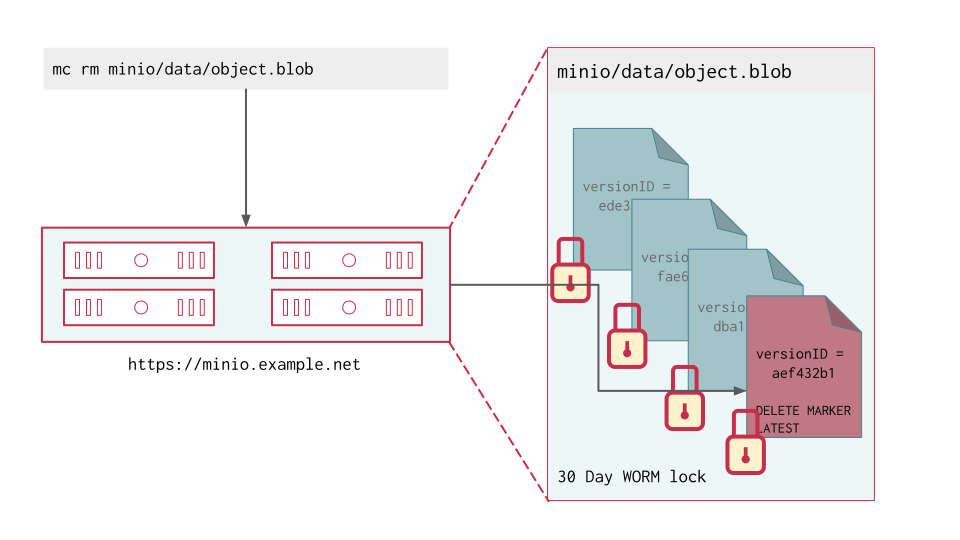
Delete operations follow normal behavior in versioned buckets, where MinIO creates a DeleteMarker for the object. However, non-Delete Marker versions of the object remain under the retention rules and are protected from any specific deletion or overwrite attempts.
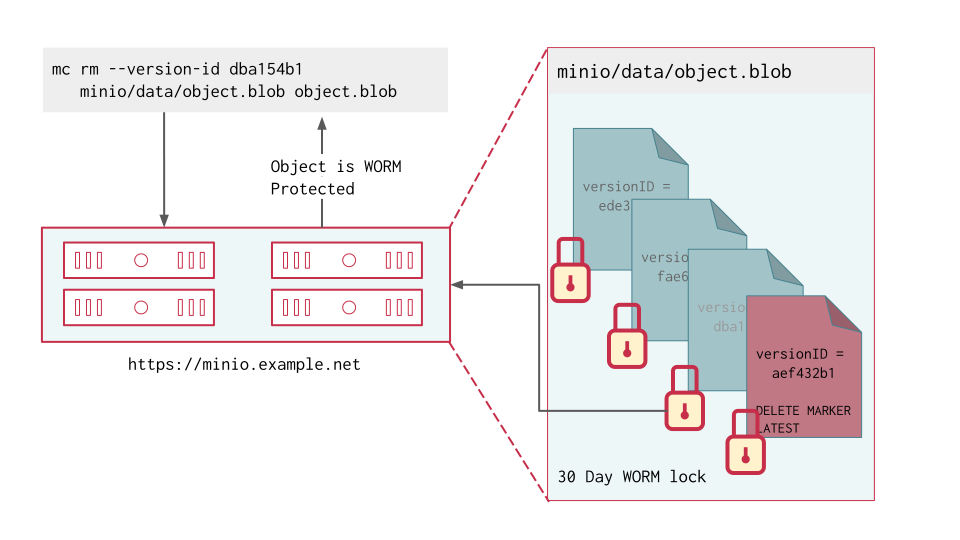
MinIO blocks any attempt to delete a specific object version held under WORM lock. The earliest possible time after which a client may delete the version is when the lock expires.
MinIO object locking is feature and API compatible with AWS S3. This page summarizes Object Locking / Retention concepts as implemented by MinIO. See the AWS S3 documentation on How S3 Object Lock works for additional resources.
You can only enable object locking during bucket creation as per S3 behavior. You cannot enable object locking on a bucket created without locking enabled. You can then configure object retention rules at any time. Object locking requires versioning and enables the feature implicitly.
Interaction with Versioning
Objects held under a WORM lock are immutable until the lock expires or is explicitly lifted. Locking is per-object version, where each version is independently immutable.
If an application performs an unversioned delete operation on a locked object, the operation produces a delete marker. Attempts to explicitly delete any WORM-locked object fail with an error. Delete Markers are not eligible for protection under WORM locking. See the S3 documentation on Managing delete markers and object lifecycles for more information.
For example, consider the following bucket with GOVERNANCE Mode locking enabled by default:
Attempting to perform a delete on a specific version of data.csv fails due to the object locking settings:
Attempting to perform an unversioned delete on data.csv succeeds and creates a new DeleteMarker for the object:
Interaction with Lifecycle Management
MinIO object expiration respects any active object lock and retention settings for objects covered by the expiration rule.
- For expiration rules operating on only the current object version, MinIO creates a Delete Marker for the locked object.
- For expiration rules operating on non-current object versions, MinIO can only expire the non-current versions after the retention period has passed or has been explicitly lifted (e.g. legal holds).
For example, consider the following bucket with GOVERNANCE Mode locking enabled by default for 45 days:
Creating an expiration rule for current objects older than 7 days results in a Delete Marker for the object:
However, an expiration rule for non-current objects older than 7 days would only take effect after the configured WORM lock expires. Since the bucket has a 45 day GOVERNANCE retention set, only the v1 version of data.csv is unlocked and therefore eligible for deletion.
In SILO 20261109, lifecycle delete-all actions (ExpiredObjectAllVersions and DelMarkerExpiration, #297) and batch expire and keyrotate jobs (#310) also preserve Object Lock protected versions instead of bypassing active retention or legal holds.
Interaction with Bulk Deletion and Replication
Starting in SILO 20261109, bulk deletion and replication enforce the following Object Lock guarantees:
- Sequential mutation-locked version purges (
DeleteObjects): S3DeleteObjectschecks physical version removals sequentially under the same mutation lock used for retention and legal-hold updates, merging protection state across all server pools (commit6ef3a52fc). Large version-purge batches in Object Lock buckets therefore take longer, while delete-marker creation and ordinary buckets retain the concurrent bulk path. - Directory
null-version protection: Bulk deletion checks Object Lock retention and legal hold on directory objects before removing a directorynullversion (commitaa2d79daf). - Target protection on replicated deletes: Bucket and site replication preserve the target’s legal hold and retention on replicated deletes (commit
7e9ee6bef). A source purge that bypassedGOVERNANCEretention does not bypass retention on a target copy that still carries active protection; the target refuses the purge and the source retries.
Tutorials
Create Bucket with Object Locking Enabled
You must enable object locking during bucket creation as per S3 behavior. You can create a bucket with object locking enabled using the MinIO mc CLI or using an S3-compatible SDK.
Use the mc mb command with the --with-lock option to create a bucket with object locking enabled:
- Replace
ALIASwith thealiasof a configured MinIO deployment. - Replace
BUCKETwith thenameof the bucket to create.
Configure Bucket-Default Object Retention
You can configure object locking rules (“object retention”) using the MinIO mc CLI, or using an S3-compatible SDK.
MinIO supports setting both bucket-default and per-object retention rules. The following examples set bucket-default retention. For per-object retention settings, defer to the documentation for the PUT operation used by your preferred SDK.
Use the mc retention set command with the --recursive and --default options to set the default retention mode for a bucket:
- Replace
MODEwith either COMPLIANCE or GOVERNANCE. - Replace
DURATIONwith the duration for which the object lock remains in effect. - Replace
ALIASwith thealiasof a configured MinIO deployment. - Replace
BUCKETwith the name of the bucket on which to set the default retention rule.
Enable Legal Hold Retention
You can enable or disable indefinite legal hold retention for an object using the MinIO mc CLI or using an S3-compatible SDK.
You can place a legal hold on an object already held under a COMPLIANCE or GOVERNANCE lock. The object remains WORM locked under the legal hold even when the retention lock expires. You or another user with the necessary permissions must explicitly lift the legal hold to remove the WORM lock.
Use the mc legalhold set command to toggle the legal hold status on an object.
- Replace
ALIASwith thealiasof a configured MinIO deployment. - Replace
PATHwith the path to the object for which to enable the legal hold.
Object Retention Modes
MinIO implements the following S3 Object Locking Modes:
| Mode | Summary |
|---|---|
| GOVERNANCE Mode | Prevents non-privileged users from mutating or modifying the object or its locking settings. Users with s3:BypassGovernanceRetention on the bucket or object can modify the object or its locking settings when passing the bypass header. SILO lifts the lock automatically after the configured retention duration expires. |
| COMPLIANCE Mode | Prevents any operation that mutates or modifies the object or its locking settings. No user can modify the object or shorten its retention before expiration, including the root user. SILO lifts the lock automatically after the configured retention duration expires. |
GOVERNANCE Mode
An object under GOVERNANCE lock is protected from write operations by non-privileged users.
GOVERNANCE locked objects enforce managed-immutability for locked objects, where users with the s3:BypassGovernanceRetention action can modify the locked object, change the retention duration, or lift the lock entirely. Bypassing GOVERNANCE retention also requires setting the x-amz-bypass-governance-retention:true header as part of the request.
The MinIO GOVERNANCE lock is functionally identical to the S3 GOVERNANCE mode.
COMPLIANCE Mode
An object under COMPLIANCE lock is protected from write operations by all users, including the MinIO root user.
COMPLIANCE locked objects enforce complete immutability for locked objects. You cannot change or remove the lock before the configured retention duration has passed.
The MinIO COMPLIANCE lock is functionally identical to the S3 COMPLIANCE mode.
Legal Hold
An object under legal hold is protected from write operations by all users, including the MinIO root user.
Legal holds are indefinite and enforce complete immutability for locked objects. Only privileged users with the s3:PutObjectLegalHold permission can set or lift the legal hold.
Legal holds apply at the object level. If you enable legal hold for a group of objects, such as the contents of a bucket, subsequently created objects in that bucket are not affected.
Legal holds are complementary to both GOVERNANCE Mode and COMPLIANCE Mode retention settings. An object held under both legal hold and a GOVERNANCE/COMPLIANCE retention rule remains WORM locked until the legal hold is lifted and the rule expires.
For GOVERNANCE locked objects, the legal hold prevents mutating the object even if the user has the necessary privileges to bypass retention.